Internal office moves: the fastest, least disruptive way to run internal office moves is to treat the job as an IT and continuity project first, then wrap the physical move around it in phases. Appoint a relocation lead this week and book an IT dry run before you touch a single desk. Once that’s locked in, work through the checklist below to get everything else moving.
TL;DR:
- Appoint a dedicated relocation lead and team contacts to streamline decision-making and prevent delays on move day.
- Reserve loading dock slots early and order ISP installation immediately, as both are common sources of move delays if overlooked.
- Conduct a full IT dry run and set rollback criteria beforehand to avoid unforeseen technical issues disrupting the transition.
- Plan for a phased weekend move with pilot, volume, and final precision phases, ensuring milestones are confirmed before advancing.
- Budget more than just the removal fee, including IT costs, storage, reinstatement, and a contingency of at least 10 to 15 percent to cover unforeseen expenses.
Table of Contents
- What is an internal office move and where do you start?
- How long should you allow to plan an office move?
- Who runs the relocation and who decides what
- How do you keep IT and telecoms running through the move?
- What building and logistics details get overlooked?
- What does an internal office move actually cost?
- How do you run move week and move day itself?
- What happens in the first 90 days after the move?
- When should you hand the move to a professional mover?
- How Van-247delivery can help with your office move
- Where to check the finer details
- Sources
- FAQ
What is an internal office move and where do you start?
An internal office move (sometimes called an office relocation or office transition) is any move of a team, floor, or entire business between workspaces, whether that’s a new building across town or a reshuffle between floors of the same block. The principle that separates a smooth move from a chaotic one is simple: your network and systems need to be ready before your people are, not the other way round.
Here’s your immediate priority list, in order:
- Appoint a relocation lead and department contacts. One named person owns the whole project and sets decision thresholds, so nobody’s waiting on a group email at 4pm on move day.
- Reserve loading dock and lift slots now. Building management teams book these weeks out, and a missed slot can push your entire timeline by days.
- Order ISP installation at the new site immediately. Broadband providers routinely need lead time measured in weeks, not days, and this single item causes more delayed moves than furniture ever does.
- Schedule your IT dry run. Treat the relocation as an IT and operational continuity project from day one, because network readiness controls your go-live date far more than the physical transport does.
- Run a full inventory with Move, Replace, Dispose, and Store tags. Map every tagged item to a destination code on the new floorplan so receiving crews know exactly where things go without asking.
Get these five moving and you’ve already de-risked the project more than most businesses manage in a month of planning meetings.
How long should you allow to plan an office move? Part of internal office moves
Timeline length depends on complexity, not headcount alone. A small office with no servers to relocate can often work to an 8 to 10 week planning window, while a move involving multiple departments, server rooms, or a full fit-out at the destination typically needs several months of careful planning. Underestimating this is the single most common mistake office managers make.
The weekend itself usually breaks into three phases, and understanding why matters more than following the labels blindly:
- Pilot phase (Friday). Move a small, low-risk batch first, test your labelling system, loading logistics, and receiving process on a manageable scale, and fix anything that breaks before it becomes a Saturday-sized problem. A pilot phase that tests labels and receiving catches errors while the cost of a mistake is still small.
- Volume phase (Saturday). This is the bulk of the move, furniture, general equipment, and the majority of boxed items. A staged sequence sized to building throughput rather than crew headcount protects your uptime, because when truck or mover capacity hits a practical ceiling, adding more people to the same loading dock doesn’t help. You split into another wave instead.
- Precision phase (Sunday). Servers, sensitive equipment, and final IT reconnection happen here, once the building is quiet and the risk of a knock or a dropped box has dropped with it.
Each phase needs a milestone sign-off before the next begins. Don’t let Saturday’s volume work start until Friday’s pilot has confirmed labels, lift access, and receiving actually work as planned.
Who runs the relocation and who decides what? Part of internal office moves
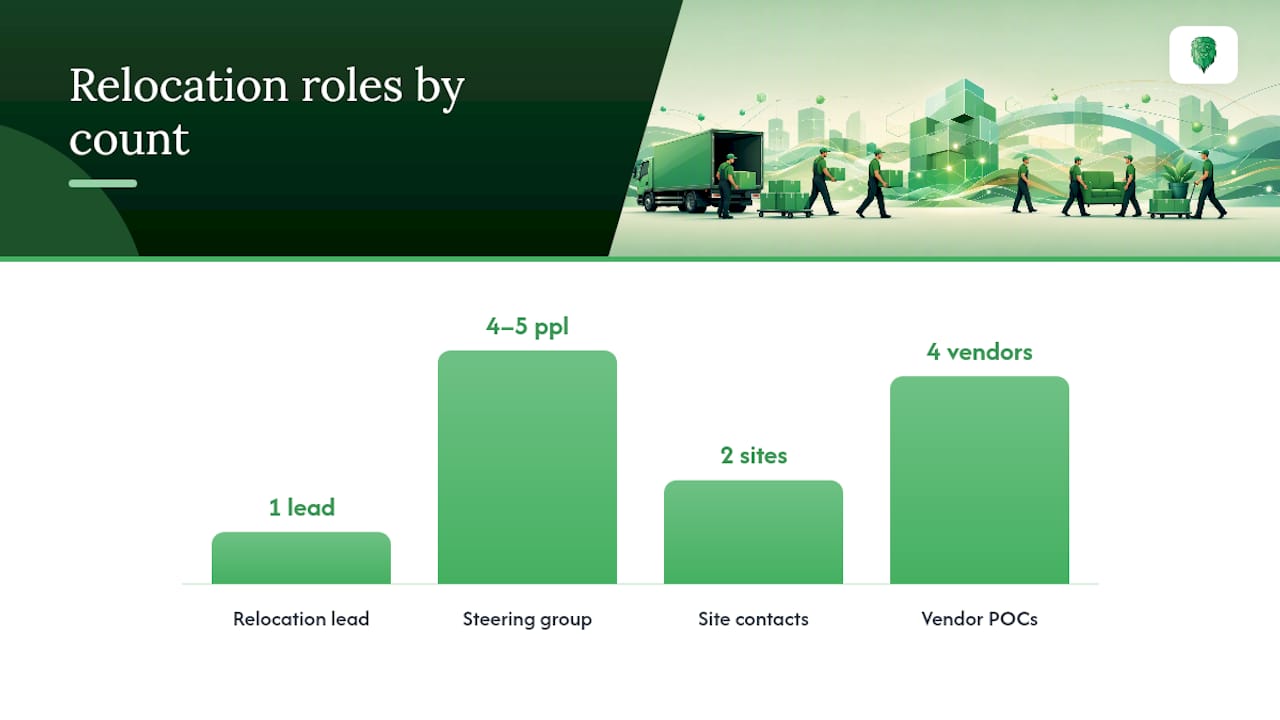
Every successful internal office move has a named relocation lead, backed by a small steering group rather than a committee. That lead owns the calendar, the budget conversation, and every “yes or no” that would otherwise stall on move day.
Your governance structure needs:
- A relocation lead who chairs weekly check-ins and holds final sign-off authority on scope changes.
- A steering group of no more than four or five people: facilities, IT, HR, and a senior sponsor who can unlock budget fast.
- Department contacts at both the origin and destination sites, so questions about “where does this go” never bottleneck through one person.
- Vendor points of contact for movers, the ISP, the landlord’s building management team, and your furniture supplier, all listed in one shared document.
- Clear approval thresholds. Decide in advance what a department contact can approve on the spot versus what needs the steering group, so nobody’s waiting on a Teams reply while a lorry idles at the dock.
Without this structure, decisions that should take thirty seconds end up taking half a day, usually because three people all thought someone else had authority to say yes.
How do you keep IT and telecoms running through the move? Part of internal office moves
Run IT as its own project, with its own timeline, sitting alongside the physical move rather than following it. This is the section most office managers underinvest in, and it’s the one most likely to cause a Monday morning of angry emails if it goes wrong.
Start with a full asset list: every server, switch, phone system, and piece of AV kit, with a shutdown and reconnect sequence written down in order. Order your new ISP connection as early as your lease allows, because installation slots for business-grade broadband regularly run four to six weeks out, and confirm backups of everything before a single cable gets unplugged.
Then run the dry run properly. A technology dry run with representative devices, tested weeks before occupancy, tells you what actually breaks when systems move, not what you assume will break. Log every failure, the owner responsible for fixing it, and how long resolution took, so you’re not troubleshooting live on move-in day.
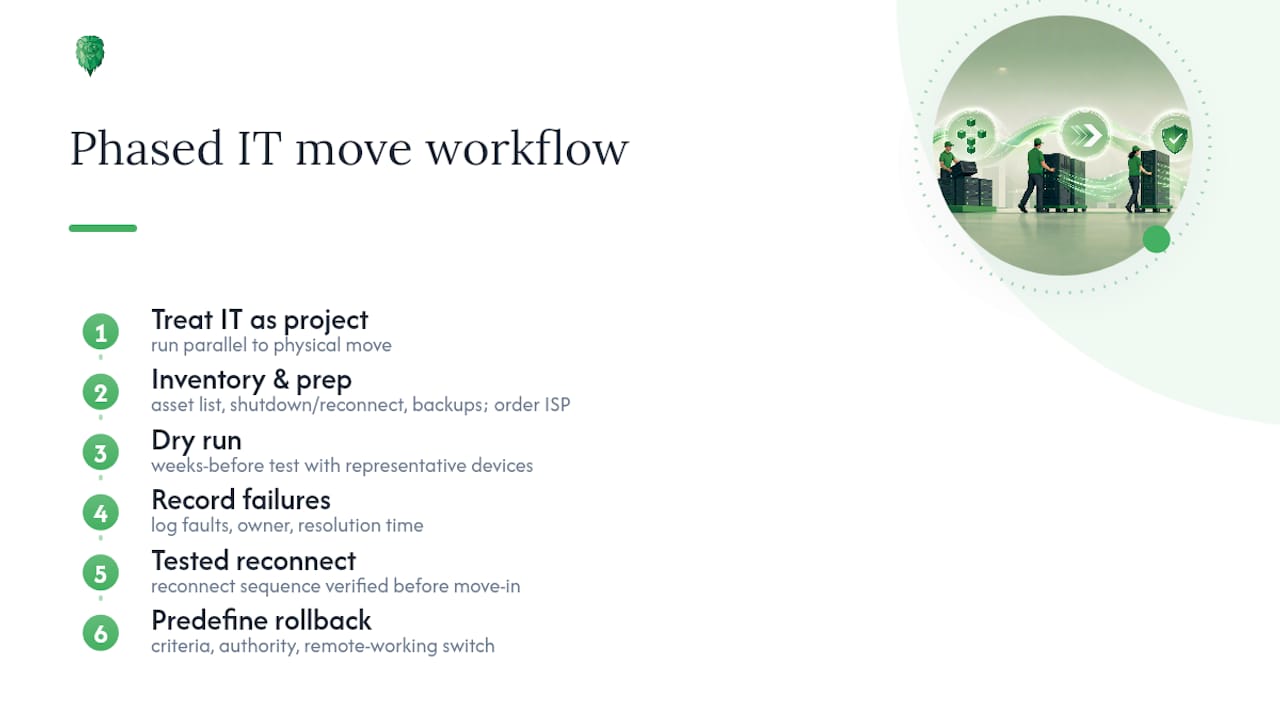
Pro Tip: Set rollback criteria before the move, not during it. Decide in advance what “this isn’t working, revert to the old office network for 48 hours” actually looks like, including who has authority to call it and how staff switch to remote working in the meantime.
If you’re relocating server infrastructure specifically, detailed guidance on IT equipment moving covers the physical handling side that a dry run alone won’t catch.
What building and logistics details get overlooked? Part of internal office moves
Loading docks, lifts, and parking bays are booked by the building, not by you, and most delays trace back to someone assuming access would “just be available” on the day.
Confirm these well ahead of move week:
- Loading dock and freight lift reservations, including exact time windows, because shared buildings often allocate slots to several tenants on the same weekend.
- Lift dimensions, checked against your largest items, since more than one office move has stalled because a desk or server rack simply didn’t fit.
- Building protection requirements, such as corridor covers and lift padding, which many landlords insist on before granting access, plus proof of movers’ insurance.
- Destination coding on every label and floorplan. Assigning the same destination codes to labels, floorplans, and manifests means receiving crews place boxes correctly without radioing someone for instructions every ten minutes.
- Proof-of-delivery checks at both ends, so a missing item is flagged the same day, not discovered three weeks later when someone needs it.
Special handling deserves its own line item too. Pianos, boardroom tables, and specialist lab or print equipment need different packing rules to a filing cabinet, and treating them the same way in your inventory is how expensive things get damaged.
What does an internal office move actually cost? Part of internal office moves
Budget for more than the removal invoice. A realistic figure covers movers, packing materials, IT reconnection, temporary storage, cleaning, and a contingency line, and the item most businesses forget entirely is reinstatement.
- Movers and packing, sized to your inventory and the number of phases you’re running.
- IT reconnection and dry-run costs, including any temporary connectivity while the new ISP line goes live.
- Storage, if your move date and lease dates don’t line up neatly.
- Cleaning, at both the old and new site.
- Reinstatement and dilapidations. Checking lease decommissioning clauses early matters because restoration costs at your old site can exceed your entire move budget if you leave it until the final month.
- Contingency, realistically 10 to 15% on top of everything else.
Lease overlap, where you hold both sites for a few weeks, isn’t wasted money if you use it deliberately. Using overlap for staging and testing rather than letting it drift gives you a buffer to trial the IT dry run and stage furniture without pressure. Set a hard end date on the overlap, though, or it quietly becomes an open-ended cost nobody budgeted for. The business case for planning early is worth reading if you need to justify the budget upstream.
How do you run move week and move day itself? Part of internal office moves
- Confirm everything again, five days out. Vendor arrival windows, building access approvals, new signage at the destination, and an emergency contact list distributed to every department, not just the steering group.
- Brief every team on the move-day sequence. Who’s on-site at the old address, who’s receiving at the new one, and who from IT is physically present for the cutover, not just on call.
- Walk both sites before anyone starts loading. A documented walk-through at origin and destination, checked against the floorplan codes, catches problems while there’s still time to fix them.
- Run your readiness sweep before staff arrive. A documented sign-off process ahead of staff return confirms desks, phones, and network access all work before you announce “you’re clear to come in.”
- Open one issue-reporting channel for the day. A single Slack channel or shared inbox, with someone triaging by priority, beats five people fielding “the printer’s not working” messages separately.
- Log everything that didn’t get fixed as a punch list, with an owner and a target date, rather than letting loose ends drift into “we’ll sort it eventually.”
Practical, tactical advice for minimising disruption on the day is worth reviewing with your steering group the week before, so nobody’s improvising the sequence from memory.
What happens in the first 90 days after the move? Part of internal office moves
Run your readiness checks and damage reporting in the first 48 hours, while memories are fresh and any snags are still easy to trace to a specific box or crew.
- Log damage and missing items immediately, cross-checked against your inventory tags.
- Collect real usage data on desks, meeting rooms, and shared spaces for the first month, because measuring actual utilisation rather than headcount assumptions is the only reliable way to know whether your new layout genuinely fits how people work.
- Adjust room allocations based on that data, not on the assumptions you made when the floorplan was drawn six months earlier.
- Close out the budget against your original estimate, including reinstatement costs from the old site.
- Run a lessons-learned session with the steering group and measure the move against whatever business case justified it in the first place.
When should you hand the move to a professional mover?
A phased weekend sequence, IT-first planning, and clear destination coding work whether you run the move in-house or bring in specialists, but complexity changes the calculation. If you’re relocating server infrastructure, working to a tight weekend window, or moving specialist items like pianos or lab equipment, a professional mover with insured transport and phased-move experience earns its cost back in reduced risk alone.
When vetting a mover, check three things: proper insurance cover, genuine experience coordinating around IT cutover windows rather than just shifting boxes, and a track record of running phased moves rather than a single all-at-once job. A company with extensive experience can handle this kind of relocation across the UK, including fragile and oversized items that often cause damage when handled by inexperienced crews.
How Van-247delivery can help with your office move
If phased weekends, IT dry runs, and destination coding sound like the right approach but you’d rather not run the logistics yourself, that’s precisely where Van-247delivery fits in. Beyond the physical move, the office relocation service covers server relocation and Wi-Fi and video conferencing system installation and reinstallation, so the technical continuity piece doesn’t sit entirely on your IT team’s shoulders.

Alongside the office move itself, Van-247delivery offers packing, furniture assembly and disassembly, and insured storage if your lease overlap needs a buffer between sites. For smaller department moves or single-floor reshuffles, man and van options give you a lower-cost route without scaling down on care.
To get an instant quote, have your move date, floorplans with destination codes, and a rough inventory ready, the same inventory you’ve already built using the Move, Replace, Dispose, and Store tags from earlier in this guide. Head to the office removals page to request your quote and get a phased plan built around your building’s actual constraints, not a generic template.
Where to check the finer details
For staff-facing communication and record-keeping guidance, the Companies House blog on surviving an office move covers address updates and team communication in plain terms. For a full task-by-phase template with named owners, the office move checklist template is worth downloading before you start assigning responsibilities.
Sources
- How to Plan an Office Move: A Complete Timeline
- The Phase-Shift Protocol™: How a staged weekend office move protects business uptime (2026)
- Office Move Checklist: Every Task, in Order (Free Template 2026)
- How to survive an office move – Companies House blog
FAQ
What happens if my employer moves the location of their office?
Employers must give reasonable notice of a location change, and if the new site significantly affects your commute, it may count as a redundancy situation under UK employment law. Check your contract’s mobility clause and speak to HR directly, as rules vary by contract and distance involved.
How much does it cost to relocate an office?
Costs vary widely by size and complexity, covering movers, packing, IT reconnection, storage, cleaning, and often-overlooked reinstatement or dilapidation charges at the old site. Office relocation pricing is typically available on request through an instant quote once you’ve got your move date and inventory ready.
What is a good moving checklist?
A good checklist assigns a named owner and due date to every task rather than listing jobs with no accountability, and typically runs to 80 or more individual tasks for larger, multi-department moves. Structuring it by phase, pilot, volume, and precision, keeps the list usable rather than overwhelming.
What should be included in an office moving checklist?
At minimum: a relocation lead and department contacts, dock and lift reservations, ISP installation booked early, a full inventory with destination codes, an IT dry run, and a documented readiness sweep before staff return. Miss the ISP booking specifically, and it’s the item most likely to delay your entire move.