IT equipment moving: most IT equipment moves need specialist handling, not a van and good intentions. The moment a move is confirmed, pause non-essential changes, build a full inventory, verify your backups, and decide who owns which task before you touch a single cable. Done properly, this approach cuts downtime, keeps hardware intact, and leaves you with a clean, auditable record of every device that moved.
TL;DR:
- Moving fully populated racks requires specialized handling equipment and trained technicians to avoid damage and ensure safety.
- Proper planning involves detailed inventories, site surveys, and risk assessments, with timelines ranging from weeks to several months based on move size.
- Using anti-static materials, custom crates, and photographing equipment before disconnection helps prevent damage during transit and speeds reassembly.
- Reliable chain-of-custody, climate-controlled vehicles, and certified IT asset disposition are essential to maintain data security and comply with waste regulations.
- Clear stakeholder communication and a structured post-move validation process are crucial to avoid faults that could cause prolonged downtime or data loss.
Table of Contents
- Your quick pre-move checklist for IT equipment moving
- Planning and audit: inventories, site surveys and risk assessment
- Packing and handling: ESD, crates, racks and fragile components
- Transport and logistics: vehicles, chain of custody and insurance
- Server room and data centre moves: live rack, de-rack or re-rack?
- Reinstallation, verification and post-move validation
- How to choose an IT mover or logistics partner
- What experience actually teaches you about moving tech gear
- Compliance with environmental and disposal regulations for retired equipment
- Post-move IT system testing and performance optimisation
- The uncomfortable truth about IT relocations
- How Van-247delivery can help with your move
- Sources
- FAQ
Your quick pre-move checklist for IT equipment moving
The pre-move phase is critical. starting several weeks in advance helps avoid servers going missing and cutovers slipping.
- Inventory everything — serial numbers, model, weight and physical condition for every server, switch, workstation and peripheral.
- Back up and test restores — follow the 3-2-1 rule (three copies, two media types, one offsite) and actually restore a sample file before moving day.
- Assign roles — name who owns comms, who owns the physical move, and who signs off the cutover window.
- Choose your migration approach — big-bang (everything moves at once) or phased (systems move in waves) — and book transport early, because specialist vehicles get booked up fast.
Skipping the restore test is the single most common mistake IT teams make. A backup nobody has actually restored isn’t a backup, it’s a hope.
Planning and audit: inventories, site surveys and risk assessment part of IT equipment moving
Your planning phase decides whether the physical move day runs smoothly or turns into a fire drill. It starts with a proper hardware manifest, not a vague spreadsheet.
Capture these fields for every asset:
- Asset tag, serial number, make and model
- Rack position (U-height) and cable/port mapping
- Current IP configuration and dependent systems
- Physical condition and any pre-existing damage
Run a site survey at both ends covering power capacity, cooling, floor-load ratings, and dock or lift access, because a rack that won’t fit through a doorway is a problem you want to find weeks early, not on the day. Your risk register should log dependencies (what breaks if this server is offline), rollback criteria (the point at which you abandon the move and revert), and a stakeholder notification plan.
Pro Tip: Timelines vary hugely by scale. Smaller server-room moves can sometimes be planned in a few weeks, while mid-sized environments generally require several months of lead time.
An office moving checklist built for general relocations is a useful companion here, though IT assets need their own dedicated manifest layered on top.
Packing and handling: ESD, crates, racks and fragile components part of IT equipment moving
Electronics fail in transit for reasons that have nothing to do with dropping them. Vibration, thermal shock, and static discharge do far more damage than most IT teams expect, and specialised handling is what prevents it.
- Use ESD-safe materials: antistatic foam, conductive bags and grounded containers for anything with exposed circuitry.
- Build custom crates for high-value or oddly-shaped equipment, sealed with tamper-evident tape so any interference is obvious.
- Secure monitors screen-to-screen with padding, remove and box drives and GPUs separately, and pull expansion cards if the chassis will be tilted or shocked in transit.
- Decide early whether you’re de-racking components or moving racks intact, because that choice shapes every packing decision that follows.
Pro Tip: Photograph every server chassis and cable run before disconnecting anything. If a rack goes back together in the wrong order, those photos save hours of guesswork.
Our office packing tips cover general fragile-item handling, but server hardware deserves its own protocol on top.
Transport and logistics: vehicles, chain of custody and insurance, part of IT equipment moving
The vehicle matters as much as the packing. Air-ride suspension absorbs road shock that ordinary van suspension simply passes straight through to a rack full of drives, and climate control and direct routing reduce thermal and handling risk further.
- Insist on air-ride vehicles with climate control for any load carrying spinning disks or sensitive electronics.
- Maintain chain-of-custody with signed manifests, tamper-evident seals, and GPS tracking on the vehicle itself.
- Build an evidence pack as you go: photos, seal numbers and timestamps at every handoff, which speeds up any insurance claim later.
- Declare high-value loads explicitly to your insurer and check the policy’s per-item limits before moving day, not after.
If you’re shipping crated equipment over a longer distance or need secure overnight storage between legs, a containerised storage solution can bridge the gap safely.
Server room and data centre moves: live rack, de-rack or re-rack, part of IT equipment moving?
This is the decision that trips up most first-time movers. Moving a fully populated rack intact, sometimes called a lift-and-shift, is faster because you skip the hours of disconnecting, labelling and reassembling every unit. It only works with the right kit, though.
- Live rack moves need rack jacks, floating pallets and technicians trained specifically in rack handling. This approach can save significant reassembly time but demands strict anti-tilt controls throughout.
- De-racking makes more sense for older railings, vibration-sensitive drives, or any transport leg with awkward corners and lift access. Tag every U-position before removal and preserve the CPU and PCI configuration order so the re-stack is identical.
- Establish ESD-safe zones at both the departure and arrival points, not just during packing.
Pro Tip: If you’re moving into or out of a colocation facility, involve the NOC early. Power sequencing and cross-connect scheduling often take longer to arrange than the physical move itself.
Rack jacks and floating pallets aren’t optional extras for a live rack move. Used without proper anti-tilt and load-distribution controls, they turn a time-saving shortcut into the fastest way to damage a whole rack of hardware.
Reinstallation, verification and post-move validation, part of IT equipment moving
Getting equipment to the new site is only half the job. Reassembly needs the same discipline as the teardown.
- Verify cable mapping against your pre-move photos and restore correct rack elevations before powering anything on.
- Power up in sequence, starting with core network infrastructure, then run sanity checks on each dependent system.
- Run a structured 30-day post-move audit, watching for intermittent faults that only surface under full load.
- File your evidence pack, complete with seal numbers, photos and signed manifests, in case you need it for an insurance or warranty claim.
Pro Tip: A post-move validation schedule with explicit rollback criteria and a 30-day audit window is standard practice on well-run relocations, and it’s the difference between finding a fault at 2am on day three versus catching it calmly during a scheduled check.
How to choose an IT mover or logistics partner, part of IT equipment moving
Not every removals firm can handle server-grade hardware, and the wrong choice shows up fast once drives start failing weeks later.
- Require proven specialist experience with IT or data-centre relocations, not just general commercial moves.
- Confirm they use air-ride vehicles, follow documented ESD practice, and bring trained on-site technicians rather than general labour.
- Ask direct questions: How is the inventory tracked? What does chain-of-custody look like on paper? Are staff vetted and DBS-checked? What are the actual insurance limits, not just the headline figure?
- Watch for red flags: vague answers on insurance caps, no written RAMS (risk assessment method statement), or reluctance to run a small pilot move first.
- Ask what the evidence pack and project plan actually contain before you sign anything. A proper supplier hands you a phased plan covering audit, transport, reinstallation and validation, not a one-page quote.
What experience actually teaches you about moving tech gear, part of IT equipment moving
Fifteen years of UK logistics work across house removals, office relocations and specialist courier jobs teaches you one consistent lesson: the moves that go wrong are the ones where nobody wrote anything down. Labelling every cable before disconnection and mapping desks to their new destinations in advance turns a chaotic reassembly into a checklist exercise.
Fragile electronics reward patience during packing far more than they reward speed. A rack strapped correctly and padded properly will survive a bumpy motorway; one packed in a hurry rarely does.
If you’re planning a move, request a site survey and an inventory template before committing to a date. It costs nothing and tells you exactly what you’re dealing with.
Compliance with environmental and disposal regulations for retired equipment
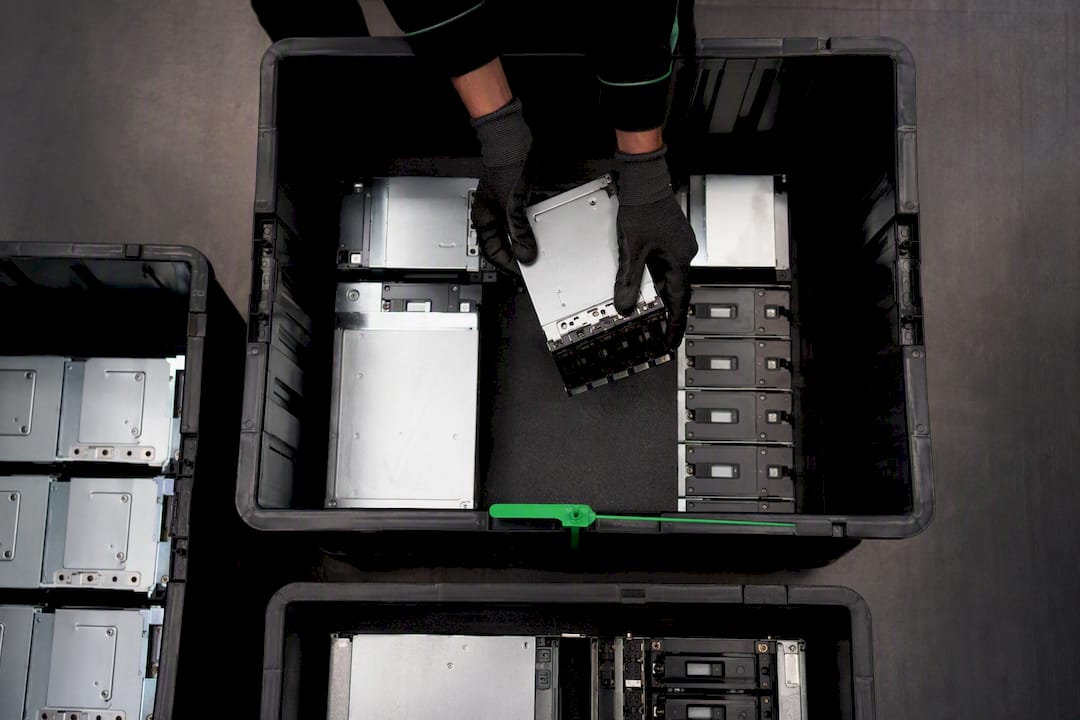
Not every device makes the trip to the new site, and what happens to the rest matters legally, not just practically. Old servers, switches and monitors fall under the Waste Electrical and Electronic Equipment Directive, which governs how electronic waste must be handled and recycled rather than simply binned or left in a skip.
In practice, this means retired hardware needs to go through a certified IT Asset Disposition (ITAD) route wherever one is available, with drives wiped or destroyed to a verifiable standard before anything leaves the building. Keep a disposal log alongside your relocation manifest: what left the building, where it went, and proof of secure data destruction. This isn’t just good housekeeping. If a retired laptop full of customer data turns up somewhere it shouldn’t, the compliance failure sits with the business that owned it, not the scrapyard.
Build disposal into the move plan from day one rather than treating it as an afterthought once the new office is up and running. Equipment earmarked for disposal should be tagged and segregated during the inventory stage, kept away from live-hardware storage, and handled by a provider who can issue a certificate of destruction. That certificate becomes part of your evidence pack, sitting next to your transport manifests and tamper-seal photos, so you have a complete paper trail covering everything that happened to every asset, whether it moved to the new site or didn’t move at all.
Post-move IT system testing and performance optimisation
Powering everything back on isn’t the finish line. It’s the point where testing actually starts, and skipping this stage is how minor faults from transit turn into major outages weeks later.
Run functional tests on every core system in the same order you powered them up: network first, then storage, then application layers. Check throughput and latency against your pre-move baseline figures, not just against “does it work”. A server that boots fine can still be running at a fraction of its previous disk speed if a drive took a knock in transit that didn’t cause outright failure.
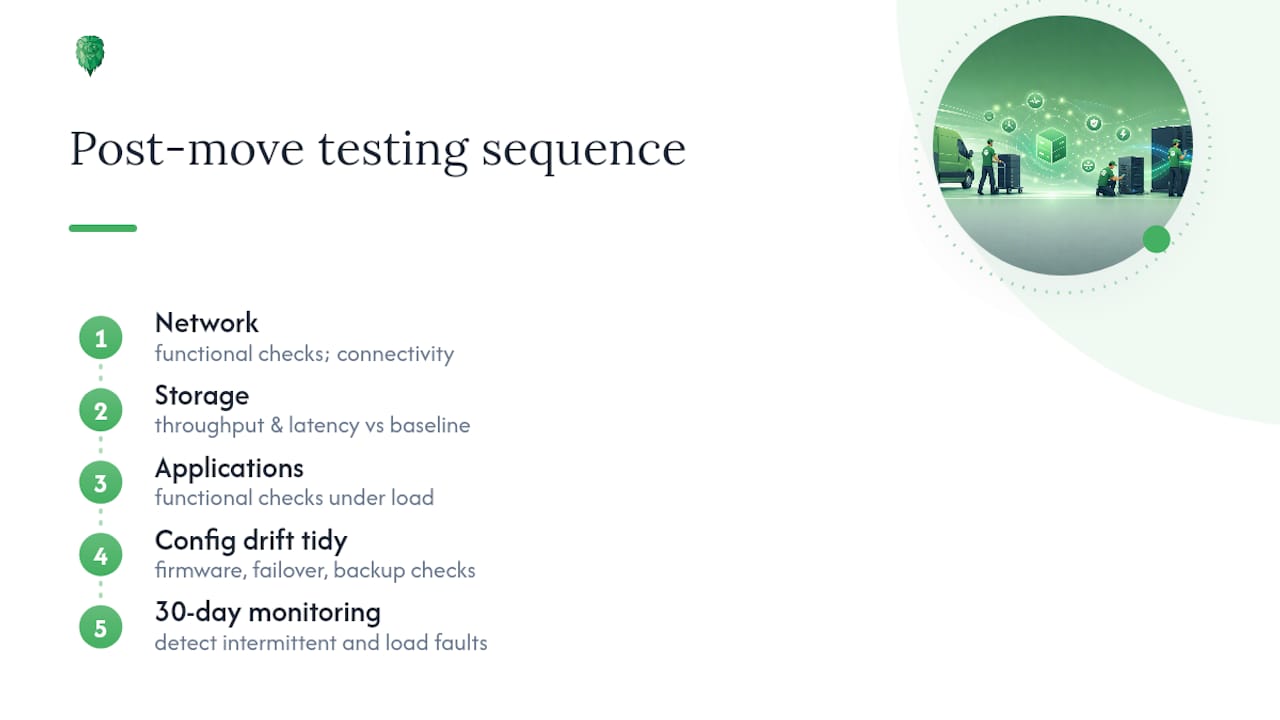
Beyond basic function, look specifically for the problems that vibration and handling cause: intermittent memory errors, drives dropping out of RAID arrays under load, and network cards negotiating at lower speeds than before the move. These often only appear once real traffic hits the system, which is exactly why a 30-day monitoring window matters more than a same-day pass or fail check.
Use the move as a natural point to tidy up configuration drift too. Confirm firmware versions match across redundant pairs, check that failover and backup jobs actually ran on their new schedule, and re-baseline your monitoring thresholds for the new environment (different power circuits and cooling profiles can shift normal operating temperatures slightly). A move rarely improves performance on its own, but a careful post-move review often catches inefficiencies that had been quietly accumulating for years.
The uncomfortable truth about IT relocations
Most guidance on IT equipment moving focuses obsessively on the physical logistics: the vehicles, the crates, the rack jacks. That’s necessary, but it’s not where most projects actually fail. They fail on communication.
The businesses that struggle aren’t the ones with underpowered vans or flimsy packing. They’re the ones where the IT team assumed facilities had booked the lift access, facilities assumed IT had confirmed the cutover window, and nobody told the end users their email would be down for six hours. A perfectly executed physical move, delivered into a communications vacuum, still produces confused staff and a help desk fielding calls it can’t answer.
Conventional checklists undersell stakeholder notification and treat it as a footnote next to the technical steps. It deserves equal billing. Before you book a single vehicle, agree the cutover window with the people who’ll feel it, and confirm who tells end users what’s happening and when.
If there’s one priority above all others, it’s this: treat the risk register and the communications plan as seriously as the packing list. Hardware that arrives intact but unannounced still counts as a failed move in the eyes of the people who couldn’t work that morning.
— Claudiu
How Van-247delivery can help with your move
This service is a practical alternative to juggling separate suppliers for packing, transport and disposal on your own. Whether you’re shifting a handful of workstations or coordinating a full office relocation alongside your server move, our office relocations service handles the parts of the job that sit outside pure IT hardware, from desks and cabinets to general fit-out items, while you focus on the technical cutover.
For smaller moves, such as reinstalling a handful of workstations at a satellite office or supporting a phased migration, man with a van services give you flexible, insured transport without booking a full removal team. Larger loads of crated equipment or palletised hardware move well through our pallet delivery service, with same-day collection available when your timeline is tight.
Request a site survey before you commit to a date, ask for an inventory template to start your hardware manifest, and confirm insurance limits against the value of what you’re moving. Get an instant quote and take the first concrete step towards a move that goes to plan.
Sources
- Data center relocation services: phase-based process (Encor Advisors)
- Data centre regulatory and security guidance (Morgan Lewis, 2025)
- Data centre operational practices and specialist equipment (Data Center Knowledge)
FAQ
What is the biggest risk during an IT equipment move?
Data loss from an unverified backup is the biggest risk, followed closely by hardware damage from vibration or electrostatic discharge during transit and handling.
How long should I plan for an IT relocation checklist UK businesses can follow?
Smaller server-room moves typically need four to eight weeks of planning, while mid-sized environments usually require three to six months.
What is the typical IT relocation cost UK businesses should budget for?
Cost depends heavily on scale, distance and whether specialist rack-handling equipment is needed, so get a written quote based on your actual inventory and site survey rather than a flat estimate.
Should I move a populated server rack or de-rack it first?
Move it intact if the rails are modern, drives aren’t especially vibration-sensitive, and trained technicians with rack jacks are available; de-rack older or fragile systems and pack components individually with antistatic materials.
What happens to retired IT equipment during a move?
Retired hardware falls under the WEEE Directive and should go through a certified ITAD provider for secure data destruction and recycling, with a certificate of destruction kept as part of your move records.
Can Van-247delivery handle IT equipment as part of an office move?
Some moving services support office relocations, man-with-a-van services for smaller loads, and palletised transport for crated hardware, giving flexible, insured options depending on the scale of a move.