IT equipment packing move: audit every device, verify your backups actually restore, pack fragile kit properly (monitors get double-boxed always), label everything, and run a staged cutover with one person accountable. Get those three non-negotiables right, verified backups, correct packing materials, and clear chain of custody, and the rest of your IT equipment move falls into place. If the job feels beyond your team, a specialist moving company can take the risk off your hands entirely.
TL;DR:
- Ordering internet circuits at least 8 weeks in advance is crucial to avoid delays that can jeopardize the move schedule.
- Double-boxing monitors reduces the risk of damage by around 95%, making it essential for fragile equipment like displays and servers.
- Testing backups with full restore procedures before disconnection prevents data loss and confirms they can be relied upon during the move.
- Labeling every device, cable, and screw pack with detailed information and photographings streamlines reconnection and minimizes confusion on move day.
- Hiring professional movers is recommended when transitioning complex setups such as server racks or multiple workstations within tight timeframes.
Table of Contents
- Planning your IT relocation checklist: the phased timeline
- Backing up before you disconnect anything
- How do you pack monitors and IT equipment safely?
- Disconnecting and labelling: the moving-day routine
- Scheduling your move to protect business uptime
- Should you hire specialist IT movers?
- Checking everything works after the move
- Common IT relocation mistakes and how to avoid them
- Contingency planning for data security and equipment failure during transit
- Recommendations for insurance coverage during the move
- What experienced movers know about IT relocations
- Get your office IT move quoted properly
- Sources
- FAQ
Planning your IT relocation checklist: the phased timeline part of IT equipment packing move
The single biggest cause of IT relocation chaos isn’t bad packing. It’s bad timing. New internet circuits can take 4 to 8 weeks to provision, so if you start ordering connectivity two weeks before moving day, you’re already behind.
Here’s a realistic phased checklist:
- 8+ weeks out: Order new ISP circuits and cabling, confirm rack and power specs at the new site, book specialist movers if you need them.
- 4 to 6 weeks out: Finish your full asset inventory, decide what gets replaced rather than moved, schedule vendor engineers for reconnection day.
- 2 weeks out: Confirm every backup has been tested, freeze non-essential changes, brief staff on the move-day schedule.
Your inventory needs to capture the asset tag, serial number, model, current location, assigned user, a photo, and its role in the network (is it a domain controller, a shared printer, someone’s laptop?). That last field lets you triage sensibly: mission-critical kit moves first and gets the most protection, ageing peripherals might just get retired instead of packed.
Backing up before you disconnect anything, part of IT equipment packing move
Before a single cable comes out, back up anything that would hurt to lose: servers, NAS boxes, databases, and any workstation holding files nobody else has a copy of. A backup log isn’t proof it works. Test the restore before you decommission the source system, not after you’ve discovered the tape was corrupt.
Build your verification routine around these steps:
- Run a full test restore of at least one critical system, not just a file-level spot check.
- Confirm checksums match between source and backup where the system supports it.
- Set a snapshot retention window that covers the whole move period, not just the day itself.
- Encrypt any drives travelling separately from their host machine, and pull removable media out entirely rather than trusting it to survive transit.
- Log who has custody of each backup medium at every point, from unplugging to reconnection.
Pro Tip: Keep one verified backup copy with you personally, in your bag, not in the removal van. If anything goes wrong in transit, you still have a way back.
How do you pack monitors and IT equipment safely? Part of IT equipment packing move
Double-boxing is the method that separates careful office moves from expensive ones. Wrap the screen in anti-static film, add foam corner protectors at all four corners, sit it in an inner box, then place that inner box inside a slightly larger outer box with two to three inches of cushioning on every side. If the original manufacturer box is long gone, recreate the same suspension and corner protection rather than improvising with whatever’s lying around the stationery cupboard.
Double-boxing cuts monitor damage rates by around 95% compared to single-box packing. That figure alone should settle any argument about whether it’s worth the extra box and ten minutes per screen.
Servers deserve the same seriousness. Use purpose-built server crates or palletised skids with shock-absorbing mounts, secure loose drives before the unit moves an inch, and power down components in a labelled, documented order so nobody’s guessing at reboot time.
For everything else:
- Bag and label every peripheral, cable, and screw pack separately.
- Photograph each workstation before disconnecting it, this alone shaves real time off reassembly.
- Keep monitors upright during transport, never flat, and never stacked.
- Let equipment acclimatise to room temperature for a couple of hours before powering on, since condensation from a cold van can quietly damage internals.
Our tested guide to moving screens safely covers the same principles for larger displays and AV equipment.
Disconnecting and labelling: the moving-day routine, part of IT equipment packing move
A good labelling scheme is what turns move day from a scramble into a checklist. Each label should carry the asset ID, the desk number it’s leaving, the owner’s name, and its destination desk or rack position at the new site.
- Photograph the setup before you touch a single cable, screen, keyboard, and under-desk wiring.
- Bag cables and screws together for each device, and slot a printed copy of the photo into that same bag.
- Attach the label to both the device and its bag, so they can never be separated by accident.
- Have your designated IT lead sign the moving manifest, note the vehicle ID or registration, and supervise loading and unloading in person.
That last point matters more than people expect. Chain of custody isn’t paperwork for its own sake, it’s what lets you prove, if something goes missing, exactly where the gap happened.
Scheduling your move to protect business uptime, part of IT equipment packing move
Sequence your cutover the same way you’d sequence a system reboot: network core first, then servers, then shared services like printers and file shares, and workstations last. Nothing downstream works if the core switch isn’t live.
Wherever your budget allows it, stage the new environment in parallel. Build and test servers and network kit at the new site before the old site goes dark, so you’re migrating into a proven setup rather than debugging one under pressure.
- Set a clear service window and tell staff exactly when systems will be unavailable.
- Build in a fallback plan (a temporary hotspot, a backup phone line) in case the new circuit isn’t live on schedule.
- Keep a single point of contact for the whole move so questions don’t scatter across three different people.
Pro Tip: Run your parallel build at least a week before the move if you can. A server that’s already been tested at the new address removes most of the risk on the day itself.
Should you hire specialist IT movers? Part of IT equipment packing move
Hire specialists when the value of the kit, the complexity of the network, or the tightness of the timeframe makes DIY packing too risky. A dozen laptops and a printer? Most office teams can manage that. A server rack, a phone system, and forty workstations on a Friday-to-Monday deadline? That’s a job for people who do it every week.
Before booking anyone, ask:
- What are the insurance limits on the transport, and do they cover replacement value or just cost price?
- Have they handled server or rack moves before, specifically?
- Do they provide crating or double-boxing as part of the service, or is that on you?
- Will they give a signed handover document and proof of delivery at both ends?
However you decide to move, supervise the loading and unloading yourself, or delegate it to someone senior enough to make decisions on the spot.
Checking everything works after the move
Test in the same order you cut over: power and racks first, then network core, then servers, then shared services, then user workstations last.
- Confirm power and rack mounting are stable before switching anything on.
- Bring the network core online and check every uplink.
- Boot servers and verify against your inventory, serial numbers, cable mapping, licence activations, and monitoring alerts should all match.
- Check shared services (printers, file shares, phone lines) before releasing workstations to staff.
- Log any issue immediately, and know your rollback point in case something needs reverting.
Don’t call the move complete until monitoring dashboards are green and at least one user per department has confirmed they can work normally.
Common IT relocation mistakes and how to avoid them
Most IT move failures trace back to the same handful of errors:
- Ordering the ISP circuit late. Fix: order it the day your move date is confirmed, not the week before.
- Unlabelled cables and bags. Fix: enforce the labelling template from day one, no exceptions for “just this once.”
- Backups that were never test-restored. Fix: schedule the test restore into your calendar, not your to-do list.
- Monitors packed flat or single-boxed. Fix: follow the double-box method every time, no shortcuts for “just the small ones.”
A five-minute pre-move as final check, inventory complete, backups tested, boxes labelled, vehicle booked, saves hours of post-move firefighting.
Contingency planning for data security and equipment failure during transit
Even a well-run move needs a plan B, because vans get delayed, drives fail, and boxes occasionally go astray no matter how carefully you’ve packed them.
Start with data security. Any drive travelling separately from its host device should be encrypted before it leaves the building, and any removable media (USB sticks, external drives, backup tapes) should never travel in the same vehicle as the only other copy of that data. If you’re moving a server with sensitive information on it, consider wiping and rebuilding at the new site from a verified backup rather than risking the physical drive in transit at all. That sounds cautious, but a stolen or damaged server drive with unencrypted customer records is a far bigger problem than a day’s delay.
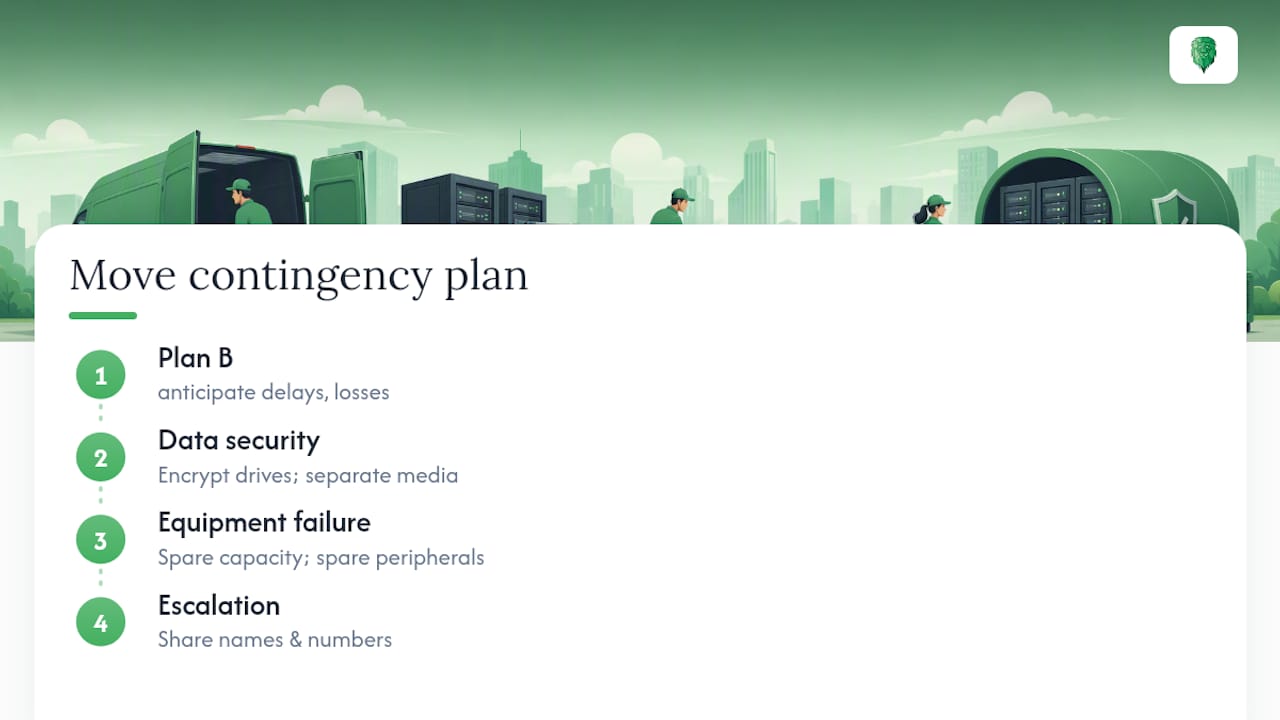
For equipment failure, build in a spare capacity plan before you need it. Know in advance which systems have a working backup you could stand up on a spare machine if the primary hardware doesn’t survive the move. Keep spare cables, power leads, and at least one spare peripheral (mouse, keyboard, monitor cable) in your own bag rather than the removal boxes, small failures like a snapped HDMI cable shouldn’t be able to stall an entire office.
Finally, agree your escalation path before move day, not during it. Who do you call if a server won’t boot at the new site? Who authorises an emergency replacement purchase? Write the names and numbers down and share them with everyone involved, including any external movers, so a hardware failure becomes a five-minute phone call instead of a half-day scramble.
Recommendations for insurance coverage during the move
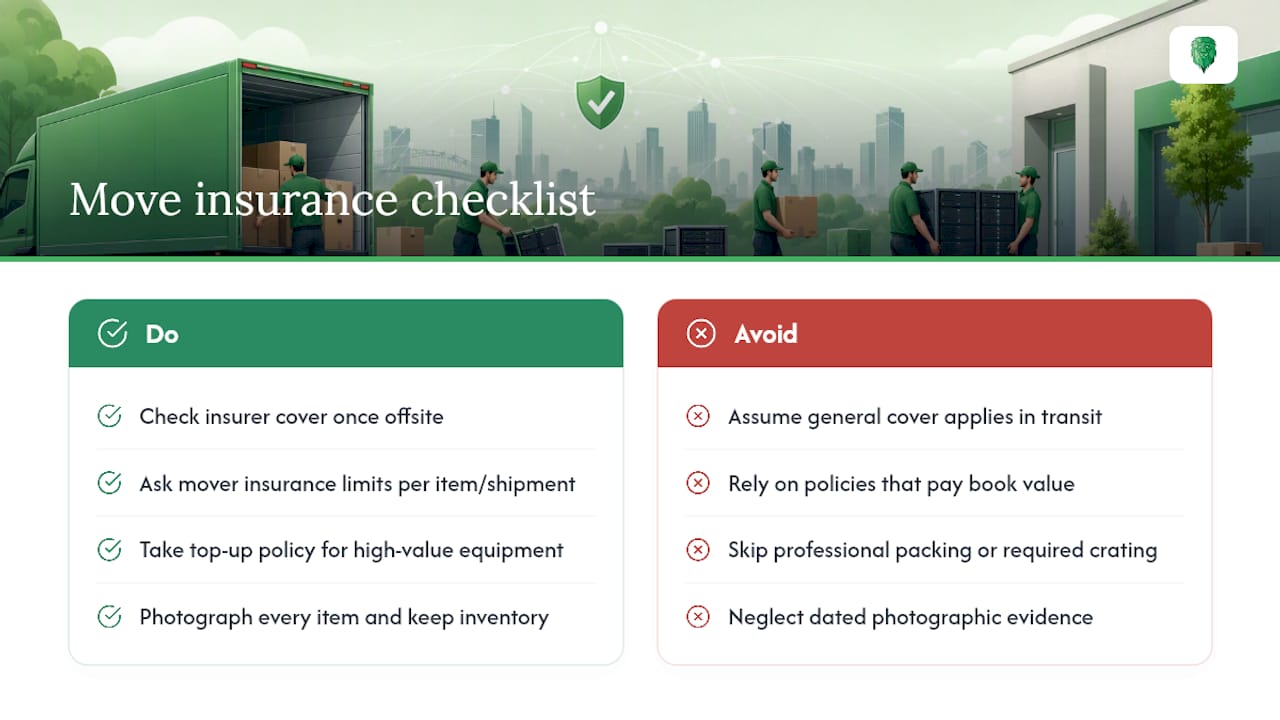
Standard office contents insurance rarely covers IT equipment adequately once it’s in transit, and this is where a lot of businesses discover a gap they didn’t know existed. Before your move date, check three things: what your existing business insurance covers once equipment leaves the building, what the removal company’s own goods-in-transit insurance covers, and where the difference between those two leaves you exposed.
Ask any mover directly what their insurance limit is per item and per shipment, and whether it covers replacement value or only the depreciated cost of the equipment. A five-year-old server might have a low book value but cost considerably more to replace with an equivalent unit, and a policy that only pays out book value could leave you well short of what you need to rebuild.
For particularly high-value equipment, servers, specialist networking kit, anything irreplaceable in the short term, consider a top-up policy for the move window specifically, rather than assuming your general business cover extends automatically. It’s also worth checking whether your insurer requires specific packing standards (professional crating, for instance) as a condition of any claim, since some policies will reduce a payout if equipment wasn’t packed to a recognised standard.
Photograph every item before it’s packed and keep those photos alongside your inventory. If you do need to make a claim, dated photographic evidence of condition and packing standard is the difference between a straightforward payout and a drawn-out dispute.
What experienced movers know about IT relocations
Handling this many moves teaches you that the equipment itself is rarely the fragile part, it’s the coordination around it that breaks. Server racks travel far better when treated as single units, rack-mounted rails secured in place, or palletised with shock-absorbing mounts, rather than dismantled and repacked piece by piece. That single decision, crate in place versus disassemble, tends to predict how smooth the reconnection day goes.
Over 15 years of insured transport work across the UK has shown one consistent pattern: the moves that go wrong are almost never the ones with the most complex kit. They’re the ones where nobody was clearly in charge of the inventory. A named IT lead, a signed manifest, and a chain-of-custody record for every device turns a stressful day into a checklist exercise.
For a handful of laptops and a printer, a well-organised in-house move is entirely reasonable. Once server racks, networking cabinets, or dozens of workstations are involved, that’s where professional packing, crating and supervised transport start paying for themselves.
— Claudiu
Get your office IT move quoted properly
If your move involves server racks, networking cabinets, or more workstations than your team can safely pack in a weekend, this is exactly the kind of job Van-247delivery’s office relocation service is built around, insured transport, specialist packing, and dedicated server relocation handled by people who’ve crated racks before, not learned on yours.

Before requesting a quote, have your asset inventory ready, rough headcount of devices, any server or rack equipment, and your preferred move dates. Flag anything unusual early: a server needing a custom crate, a boardroom AV system, or a strict downtime window, so it can be planned into the schedule rather than discovered on the day. Packing, disassembly, and even WI-FI and video conferencing reinstallation at the new site can all be arranged as part of the same job. Getting an instant quote takes a few minutes and gives you a fixed point to plan the rest of your move around.
Sources
For deeper detail, see Van-247delivery’s own guides on procurement-ready IT equipment moving and office packing tips for a smooth move, plus this IT reporting infrastructure checklist for pre-move technical readiness.
- How To Ship A Monitor Safely: Simple Packing Guide
- IT Relocation Checklist for Businesses Planning Office Moves
- IT Asset Relocation: A Step-by-Step Move Checklist
- How to pack monitors for moving
FAQ
What is the best way to pack a computer for moving?
Back up the data first, then power down and label the unit before disconnecting anything. Pack the tower in its original box where possible, or a snug alternative with padding on all sides. And keep cables bagged and labelled separately so reconnection is fast.
How should I pack electronics for moving?
Wrap screens and delicate components in anti-static material, add corner protection, and double-box anything with a screen. This single step cuts damage rates by roughly 95%. Keep electronics upright in the vehicle. And let them sit at room temperature for a couple of hours before switching them back on.
How do I pack tools and small equipment for an office move?
Group tools, screws, and small accessories into labelled bags by device or workstation. And photograph the setup before you disassemble anything. This matters as much for IT peripherals as it does for physical tools. Unlabelled small parts are the single biggest cause of slow reassembly.
What is the fastest way to pack for a move?
Work in priority order: back up and verify critical systems first. Then pack fragile and high-value kit properly, then everything else. Trying to pack everything at once, without an inventory or labelling system. Is what actually slows a move down, not the packing itself.
Should I hire a specialist for an office IT move?
Hire specialists once server racks, networking cabinets, or a tight deadline are involved. The risk of DIY handling rises sharply with that kind of kit. Van-247delivery’s office relocation and server relocation services include insured transport. And specialist packing for exactly this situation, with pricing available on request through an instant quote.