Delivery tracking basics: delivery tracking is an event-based system: every scan a parcel gets at a depot, hub or vehicle creates a timestamped record that feeds into a central database, and that’s what you see as your tracking history. It isn’t a live GPS dot following your parcel down the motorway. The one thing to do right now is find your tracking number and open the carrier’s own tracking page or app, because that’s where the real updates live.
TL;DR:
- Tracking updates are based on barcode scans or internal events, not real-time GPS location, so delays between scans are common and normal.
- “Label created” indicates digital preparation, not physical delivery, which can cause timelines to appear stalled on tracking pages.
- Gaps of 24 to 48 hours between updates are typical due to batching, overnight transport, holidays, or customs, requiring no immediate concern.
- Late or missing parcels often result from address errors or delayed scans, necessitating direct contact with the seller or courier for resolution.
- Using carrier apps, notifications, and proactively saving tracking information improves issue resolution speed and reduces hassle.
Table of Contents
- Delivery tracking basics: how the system actually works
- Where to find your tracking number and what it looks like
- What do common tracking statuses actually mean?
- Why your tracking page can look frozen for a day or two
- If your parcel is late, missing, or shows an exception
- Getting better visibility: apps, portals and live tracking
- What 15 years of parcel logistics has taught us about tracking
- A tracked, insured alternative when you’d rather not chase a courier yourself
- Sources
- FAQ
Delivery tracking basics: how the system actually works
Every time your parcel gets scanned, whether that’s a barcode read at a depot or a manual check at a local hub, a timestamp and location gets logged and pushed to a central database. That record becomes one line in the public tracking history you see when you check your parcel’s progress. The UK Warehousing Association explains tracking as an event-based system, not a continuous feed, which is why your parcel can seemingly vanish for hours between scans.
There’s a gap between what happens behind the scenes and what you see on screen. Carriers record dozens of internal events, but they usually show you a simplified status instead of the full list. According to 11tracking’s breakdown of how package tracking works, a public tracking history is often a curated list of milestones rather than everything the system knows, and a “label created” event can appear before the courier has physically touched your parcel.
Technology varies depending on where your parcel is in the journey:
- Barcode scans record most checkpoint events, from the sorting depot to the local delivery hub.
- RFID tags are increasingly used inside large distribution centres for faster, contactless reads.
- Vehicle GPS tracks the delivery van’s live position, not your individual box, unless a premium service has attached a separate tracker to your consignment.
That last point trips people up constantly. Wikipedia’s overview of track and trace technology confirms that GPS typically monitors the vehicle, and your parcel’s exact position is only as accurate as the last scan it received. Estimated delivery dates work the same way. They’re statistical predictions based on historical route performance and current capacity, not a promise, so they shift when a depot gets backed up or a route runs long.
Where to find your tracking number and what it looks like, part of delivery tracking basics
Your tracking number usually turns up in one of a handful of places, and it’s worth checking all of them before assuming it doesn’t exist.
- Order confirmation email from the retailer, sent the moment your order is placed.
- Dispatch email or SMS, sent once the parcel physically leaves the warehouse; this is usually the one with the working tracking link.
- Printed shipping label stuck to the box if you’re the one sending it, or visible through a courier’s proof-of-collection paperwork.
- Order history on the retailer’s website or app, listed against the specific purchase.
Tracking numbers come in different formats depending on the carrier and service type: some are long numeric strings, others mix letters and numbers, and a few include a short prefix that identifies the service level rather than a specific brand. If you genuinely can’t find one, go back to your order confirmation email and search your inbox for the retailer’s name plus “dispatch” or “shipped”. If that draws a blank, contact the seller directly with your order reference. They can look up the tracking number from their end even if it never reached your inbox.
What do common tracking statuses actually mean? Part of delivery tracking basics
Tracking statuses translate raw scan data into something you can actually understand, but the wording varies between carriers. Here’s what the standard ones mean in practice:
- Label created means the shipping label has been generated and the tracking number exists, but the carrier may not physically have your parcel yet. This is purely digital housekeeping.
- In transit means your parcel has been scanned at least once and is moving through the network, typically between depots or on a delivery vehicle.
- Out for delivery means your parcel is on a van, loaded that morning, and should arrive that day. This is the status that matters most if you’re waiting in.
- Delivered means the courier has recorded a successful drop-off, sometimes with a photo, signature, or “left in a safe place” note attached.
- Exception means something interrupted the normal flow: a failed delivery attempt, an address query, a customs hold, or damage discovered during handling.
The critical distinction is between statuses that mean the carrier physically holds your parcel and ones that only reflect electronic data. “Label created” is the latter, which is why it can sit unchanged for a day or two without anything being wrong. If your status has read “in transit” for well beyond the estimated delivery window, or shows “exception” with no further detail after 24 hours, that’s your cue to contact the sender or carrier rather than keep refreshing the page.
Why your tracking page can look frozen for a day or two, part of delivery tracking basics
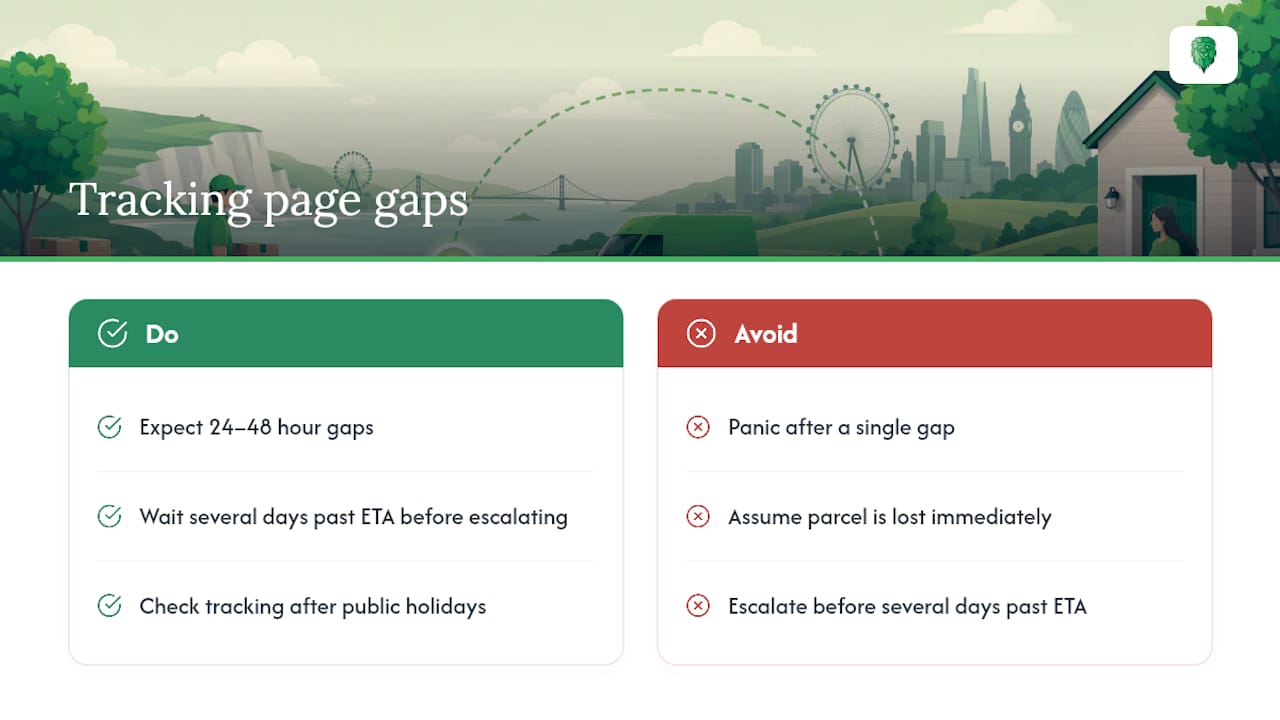
A tracking page that hasn’t moved isn’t necessarily a problem. Parcels only generate an event when they’re scanned, and the space between scan points produces no public update at all. A 24 to 48 hour gap on a domestic delivery is completely normal, according to industry best practice notes from the UK Warehousing Association, because your parcel might simply be travelling between two hubs where nothing gets scanned.
Several operational realities explain most gaps. Depots often batch-scan large volumes of parcels at set times rather than continuously, so a whole truckload can update at once, hours after arrival. Longer transport legs, especially overnight ones, naturally create silence. Public holidays slow processing everywhere, and anything crossing a border adds customs checks that don’t always generate visible updates.
As a general rule, don’t worry until you’re several days past the estimated delivery date with no movement at all. That’s the point where a routine gap becomes worth escalating rather than waiting out.
If your parcel is late, missing, or shows an exception: part of delivery tracking basics
Work through these steps in order before you assume the worst:
- Refresh the tracking page directly on the carrier’s site, not through a cached email link, since some retailer trackers lag behind the courier’s own system.
- Double check the delivery address and your contact details on the original order, since a single digit error in a postcode causes more “missing” parcels than lost stock ever does.
- Contact the seller first if you bought from a retailer, since they’re responsible for chasing the courier on your behalf and often get a faster response.
- Contact the carrier directly once you’ve exhausted the seller, with your tracking number and order reference ready. Have the expected delivery date to hand too.
- Raise a formal claim if the parcel is confirmed lost or damaged, checking the seller’s or carrier’s stated time window for complaints, which is usually a matter of days rather than weeks.
Pro Tip: Screenshot your tracking page and delivery address the day you order. If a dispute drags on, having dated proof of what the system showed at the time saves you repeating yourself to three different people.
If you booked a service that includes insured transport, check what’s covered before you need it. Knowing the claims process in advance beats scrambling for it after something’s gone wrong.
Getting better visibility: apps, portals and live tracking, part of delivery tracking basics
Official carrier apps and portals give you the fullest picture, usually with push notifications, estimated delivery windows, and a live-tracking link when your parcel qualifies for it.
- Push notifications through the carrier’s own app tend to arrive faster than retailer emails, since they come straight from the source.
- Same-day live tracking shows a delivery window, a map, and remaining stops, though it’s typically only switched on for eligible shipments on the day itself. DHL’s live-tracking feature is a good example, offering a 90-minute window with a countdown once your parcel is close.
- Third-party tracking apps and inbox-parsing tools can consolidate several carriers in one place, but check what data they access before granting inbox permissions.
- Retailer-side tracking integrations, like Shopify’s Track with Shop feature, pull complete carrier data automatically so you’re not hunting for a separate tracking link at all.
What 15 years of parcel logistics has taught us about tracking
After more than fifteen years moving goods around the UK, the pattern is always the same: customers who keep their tracking number to hand and check it proactively resolve issues in hours, not days. Photograph your labels before collection. Save the tracking link somewhere you’ll actually find it. Turn on carrier notifications rather than relying on memory, and if you’re moving anything valuable, ask about insurance cover before the van leaves, not after something’s gone missing.
— Claudiu
A tracked, insured alternative when you’d rather not chase a courier yourself
If chasing tracking numbers and juggling exception statuses sounds like more hassle than you want, a service provider can offer a more hands-off route. Jobs may come with tracked, insured transport and updates as items move, whether it’s a full house removal or a single large item on a man-with-a-van booking, so customers are not the ones refreshing a courier’s website waiting for movement.
For anything larger than a standard parcel, whether it’s a house move, an office relocation. Or a pallet that needs proper handling through a pallet network, booking a service that manages tracking on your behalf takes the guesswork out of the process entirely. Businesses shipping regularly might also want to look at how e-commerce logistics partnerships streamline this at scale. Whatever the job, you can get an instant quote for your move or delivery . And see exactly what’s included before you commit to anything.
Sources
- UK Warehousing Association — explanation of tracking as event-based
- How package tracking actually works — 11tracking
- Track and trace — Wikipedia
- DHL live tracking feature page
FAQ
How does delivery tracking work?
Every scan your parcel receives at a depot, hub. Or vehicle creates a timestamped event that’s logged to a central database. And the carrier displays a simplified version of that history to you as a status update.
Is tracked or signed for delivery better?
Tracked delivery gives you visibility on where your parcel is throughout its journey. While signed for confirms who received it at the end. For anything valuable, using both together gives you the strongest paper trail if something goes wrong.
What are the different stages of package tracking?
The typical stages are label created, in transit, out for delivery, and delivered. With exception appearing whenever something interrupts that normal flow, such as a failed attempt or a customs hold.
What do different tracking numbers start with?
Tracking number formats vary by carrier and service type. Some use purely numeric strings, others mix letters and numbers. And certain prefixes indicate the service level rather than identifying a specific sender.
Why has my tracking not updated in two days?
A gap of 24 to 48 hours between scans is normal on domestic deliveries, since parcels only generate an event. When they’re actually scanned, not while they’re travelling between checkpoints.