TV wall mount removal: taking a TV off a wall mount is usually a ten-minute job, as long as you switch everything off, work with a second person, find the release catch before you pull, and lift the set straight up rather than yanking it forward. The bit that catches people out is not the lifting. It is the cables, the hidden screws, the bracket left on the wall and the journey afterwards. This guide walks through all of it, so a wall-mounted TV arrives at your new place in one piece.
If the TV is part of a bigger move, we can take the heavy lifting and the transport off your hands with our house removals service, which includes packing and insured transport.
TL;DR
- Switch off, unplug and photograph the cables first. Label each lead so setting up at the other end takes minutes.
- Use two people for any TV of about 40 inches or more. Samsung recommends four people for sets of 82 inches and above.
- Find the type of mount (fixed, tilting or full-motion) and release it the way it was designed. Never force it.
- Keep screws, spacers and the bracket together in a labelled bag. Fill the wall holes once the bracket is off.
- Move the TV upright, wrapped, and load it last so it comes off first.
Table of Contents
- Is it easy to remove a TV from a wall mount?
- Before you start: your five-minute check
- How to release the TV from the bracket, step by step
- What to do with the bracket, screws and holes
- Moving a wall-mounted TV safely
- What does it cost to have a TV taken down?
- Moving day with a TV: a short plan
- When to ask a professional
- Our view
- Moving a TV with Van-247
- FAQ
- Sources
Is it easy to remove a TV from a wall mount?
On most mounts, yes. The TV hangs on hooks or a rail on the back of the bracket, and there is normally one catch, strap or screw that stops it lifting off by accident. Release that, lift, and the TV comes away.
What makes it feel hard is that you cannot see what you are doing. The TV sits flush, the catch is behind it, and the weight is awkward. Someone who has just moved into a flat and wants to swap a TV will often find it lifts an inch and then stops, or tilts but will not come away. That is nearly always a locking screw or a pull-tab you have not released yet.
A few things decide how easy it will be for you:
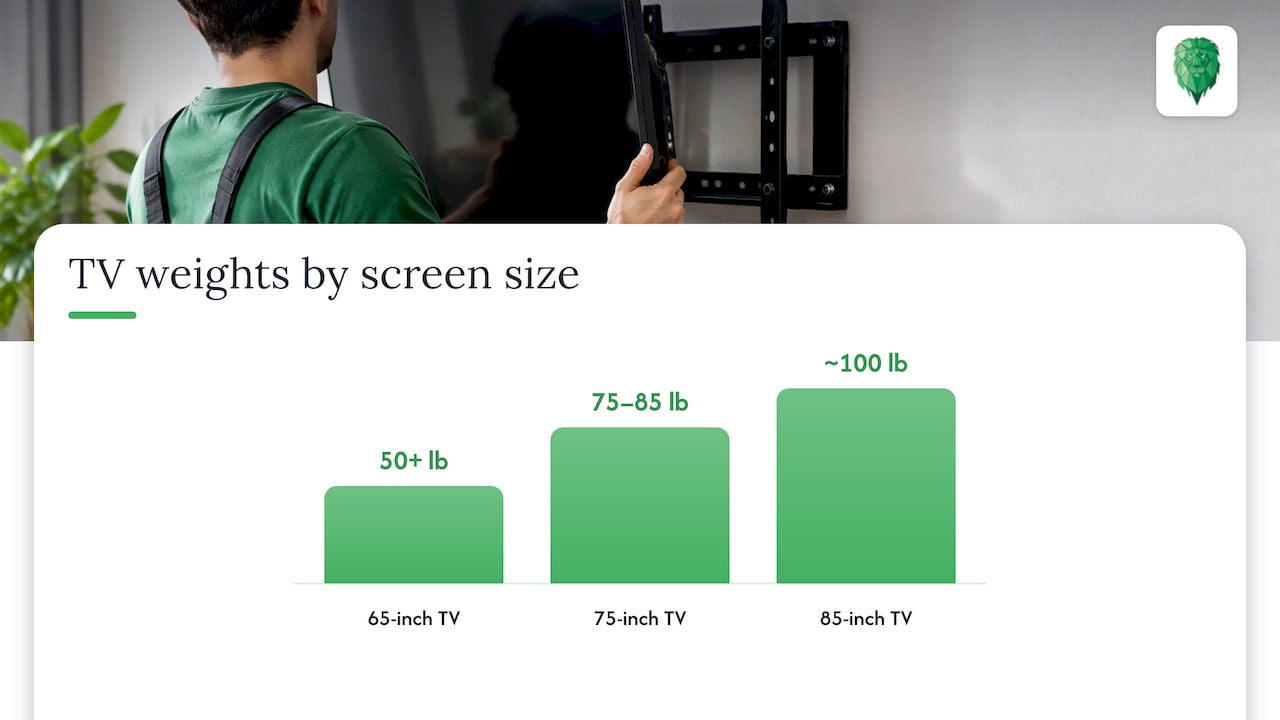
- Size and weight. The Spruce notes that most 65-inch TVs weigh over 50 pounds (about 23 kg), 75-inch sets 75 to 85 pounds and 85-inch sets around 100 pounds, so bigger TVs really need a helper.
- Height. A TV above a fireplace or high on a chimney breast changes your balance as you lift it.
- Mount type. A fixed bracket is the simplest. A full-motion arm has more moving parts and more screws.
- Wall type. This matters more for the bracket than for the TV, and we come to it below.
Before you start: your five-minute check, part of tv wall mount removal
A little preparation saves most of the usual problems.
- Switch the TV off and unplug it. LG’s UK safety guide says to disconnect the power before moving or installing a TV to avoid electric shock.
- Photograph the back of the TV with every cable connected. Then stick a strip of masking tape on each lead and write on it: HDMI 1, power, aerial, soundbar. When you set up in the new home you will thank yourself.
- Clear the floor below. You need room to stand, and somewhere soft to put the TV down: a duvet, a moving blanket or a folded rug.
- Get a second person. Samsung UK recommends two people to mount a TV and four for sets of 82 inches or larger, and the same sense applies to taking one down.
- Gather your tools. Usually a screwdriver, a set of hex (Allen) keys and a torch. A torch helps find hidden screws and locking tabs.
- Take a quick look at the screen. Photograph the screen, the corners and the back panel with the date on them. If anything is later marked, you will know whether it was there before the move.
If you are selling or renting out the property, also check whether the bracket is meant to stay. Fixtures and fittings are usually agreed in the sale paperwork, so confirm with your solicitor or estate agent before you unscrew anything.
How to release the TV from the bracket, step by step. Part of tv wall mount removal
Look at the back and sides of the TV and the lower edge of the bracket before pulling anything. Then follow the steps for your type.
Fixed or low-profile mounts
These hold the TV close to the wall. Most have a pull strap, spring tab or a lever at the bottom.
- Ask your helper to hold the TV by the frame on each side, never by the screen.
- Pull the straps or release the lever, and gently tip the bottom of the TV a few inches away from the wall.
- Lift straight up. The Spruce advises lifting at least three or four inches so the hooks clear the top ridge of the wall plate.
- Walk the TV away and lay it face up on the blanket, or stand it upright if you are packing it straight away.
Where it goes wrong: pulling the TV straight out instead of lifting. The hooks stay caught and you put strain on the bracket and the back of the set.
Tilting mounts
Tilting brackets usually have a safety screw at the bottom of each side that stops the TV lifting off.
- Back out the safety screws with the right size of driver or hex key. Use the correct size, as a wrong fit strips the head and then you have a much bigger job.
- Tilt the TV fully forward while your helper holds it.
- Lift it up and off the top rail.
Full-motion (swivel or articulating) arms
These are the ones people struggle with, because the TV sits on a moving arm.
- Pull the TV forward and swing it to one side, so you can reach the securing screw or catch, as the Spruce describes in its guide to removing a TV from a wall mount.
- Take out the securing screw, and release any cord or lever that holds the TV on the arm.
- With one person on each side, lift the TV up and away from the arm plate.
- Fold the arm back flat against the wall so it does not catch anything.
Frame TVs and flush mounts
These often use a brand-specific system. If yours is one of them, check the manual or the maker’s support page before you pull, because forcing a flush mount is how screens get damaged.
Once the TV is off
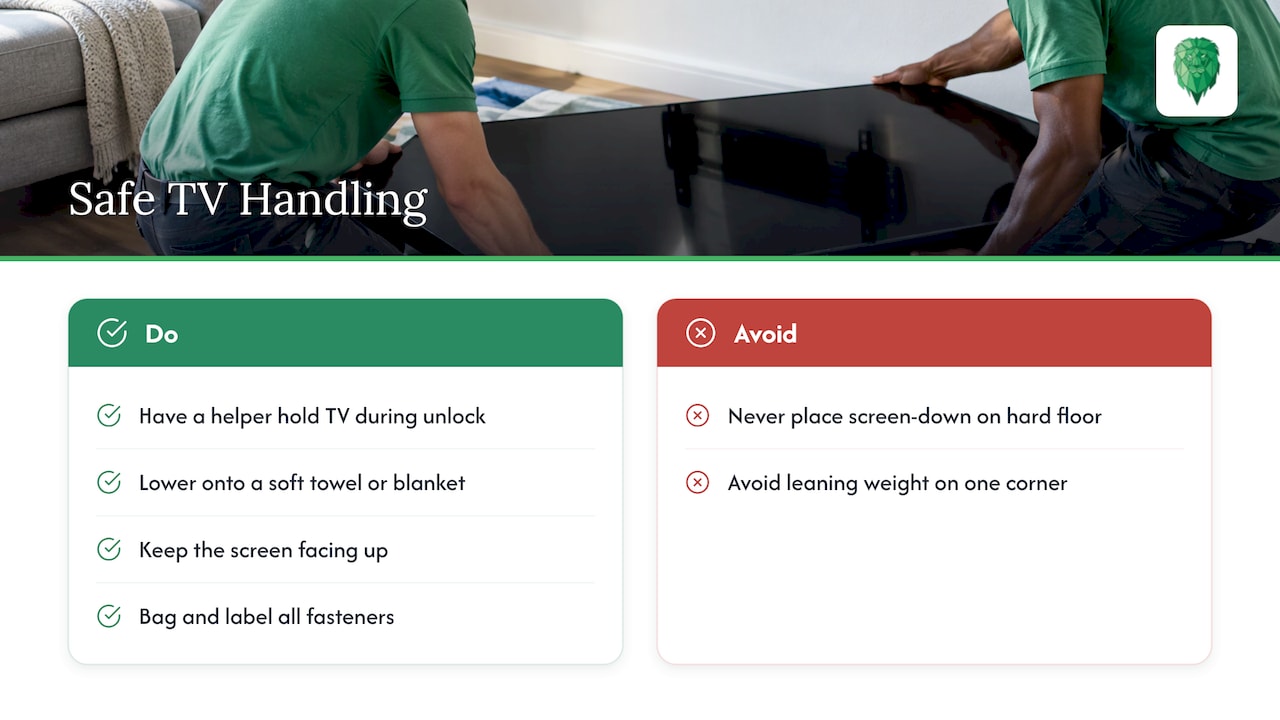
Lowe’s advises releasing the locking mechanism with a helper holding the TV, then lifting it onto a soft towel or blanket, and bagging and labelling the fasteners so they stay with the hardware. Lay the TV screen up, never on its screen face on a hard floor, and never lean it against a wall with the weight on one corner.
What to do with the bracket, screws and holes, part of tv wall mount removal
You have two choices: leave the bracket where it is, or take it down.
If it stays. Fold or push it flat, tape the fixing screws or a note to it if the next owner needs them, and mention it in the handover.
If it goes with you. Keep the bracket and every screw, spacer and washer in one labelled bag, then tape that bag to the back of the TV or put it in a box marked TV. VESA screws (the standard hole pattern on the back of the TV) and spacers are specific to the set, and the wrong length can damage it. LG’s guide says to use VESA-standard screws and wall mounts, with screw length kept under 8 mm from the back cover, and not to over-tighten, as this can damage the TV and void the warranty.
To take the bracket off the wall:
- Undo each fixing screw fully, supporting the plate as the last one comes free.
- Check behind and around the area before you pull or lever anything. Unseen cables and pipes are a risk, so go gently and stop if something feels wrong. If a fixing will not come out and you suspect a cable or pipe is close, stop and call a qualified electrician or plumber rather than forcing it.
- Do not lever the plate off with a crowbar. You will tear the plaster and make the repair bigger.
Plasterboard, brick and the fixings left behind. Part of tv wall mount removal
What is in your wall decides what you are left with. On brick or block, the plastic plugs can often be pushed in and filled over. On plasterboard with timber studs, the screws usually come out cleanly. Cavity fixings in plasterboard are a different matter: Gripit’s own FAQ notes that holes left after removing a Gripit can be filled using any method suitable for patching plasterboard.
For the holes:
- Fill with ready-mixed decorator’s filler, pressing it in slightly proud of the surface.
- Let it dry fully, then sand it flush.
- Touch up with matching paint. If you are leaving a rented home, take a photo of the finished wall.
If you rent, check your tenancy agreement for what it says about wall fixings before you drill or remove anything.
Moving a wall-mounted TV safely, part of tv wall mount removal
Getting the TV off the wall is half the job. Most damage happens afterwards, when a TV is carried, stacked or laid flat in a van.
Pack it properly.
- If you still have the original box and foam, use it. It is made for exactly that shape.
- If you do not, wrap the screen in a soft cloth, add layers of bubble wrap, pad the corners, and put the TV in a TV box or between two stiff sheets of cardboard.
- Mark every side: TV, fragile, upright only.
LG’s manual for its OLED range says to hold the side and bottom of the frame with the screen facing away, use at least two people for large TVs, keep it upright, and avoid jolts or pressure that bends the chassis. Whatever brand you own, it is a good rule.
Load it right.
- Keep it upright, in the same orientation it hung on the wall.
- Wedge it between firm, soft items such as a mattress and the back of a sofa.
- Keep anything heavy off the screen.
- Load it last and unload it first, so it spends the least time being jostled.
Our guides on how movers pack TVs and moving a TV without hidden screen damage go into packing in more detail, and our piece on moving large items safely covers the wider load.
A few other points that people ask about:
- Can you move a TV lying down? Modern flat-screens are built to be carried and stored upright. Lying one flat puts stress on the panel.
- Does a TV need to be fully dismounted before a move? Yes. The TV should be off the bracket and packed, not left to be unhooked on the day.
- What about the cable box and soundbar? Photograph the setup, bag the remotes and leads together, and label the bag with the room it came from.
What does it cost to have a TV taken down? Part of tv wall mount removal
Prices vary by TV size, mount type and where you live. MyJobQuote’s 2026 UK guide says that taking down an old TV and replacing it adds roughly £30 to £120 to a job, especially when the TV is heavy or the bracket has to come off too. The figure rises with size and awkward heights.
If the TV is going in a van with the rest of your things anyway, it makes sense to sort the dismount as part of the same job rather than as a separate visit. When you ask for a quote, tell us which items are wall-mounted, how big the TV is and whether the bracket needs to come off, so that nothing is a surprise on the day. Our waiting-time fee is £24 per hour per man, so having the TV unplugged, photographed and ready to lift before the van arrives keeps the day on track.
Moving day with a TV: a short plan. Part of tv wall mount removal
A day or two before:
- Take your cable photos and label the leads.
- Photograph the screen and the back, with the date visible.
- Find the original box if you kept it.
On the morning:
- Unplug and release the TV with a helper.
- Bag the fixings and attach the bag to the TV box.
- Pack the TV, mark it upright, and move it to the door ready to be loaded last.
At the new home:
- Unload it first and stand it upright in the room it is going to.
- Let it sit for a short while before you switch it on if it has come out of a cold van.
- Check the screen with the photos from before the move.
Moving a whole house means a lot more than a TV. If you want more ideas for the rest of the day, our safe moving tips are written to take the stress out of it.
When to ask a professional, part of tv wall mount removal
Leave it to someone with the right equipment when:
- The TV is 75 inches or larger, or you cannot find a second pair of strong hands.
- It is mounted high, for example above a fireplace.
- The wall is concrete or the fixings will not come out.
- You cannot find the release mechanism, or the TV has a flush or frame-style mount.
Samsung UK also advises contacting a professional if you do not feel comfortable mounting the TV yourself, and the same applies to taking one down. If you suspect cables or pipes behind the wall, a qualified electrician or plumber is the right call.
After the TV and bracket are gone, you are often left with a wall to fill and a home to hand back. For that stage, a guide on move-out cleaning with furniture left in place explains how the job is approached.
Our view
We have been moving people and their belongings across the UK for over 15 years, and a wall-mounted TV is one of the items that worries people most. It is expensive, it is awkward, and it is something you use every day.
Our advice is simple. Do not leave the TV to the last minute. Take it down the day before if you can, photograph it, pack it properly and tell whoever is moving you that it needs to travel upright. A calm, planned dismount is the difference between a TV that arrives ready to plug in and one that arrives with a mark you cannot explain.
That is why we offer packing, furniture assembly and disassembly alongside our removals, and why our transport is insured. The less you have to juggle on moving day, the better the day goes.
Claudiu
Moving a TV with Van-247
Whether you are moving a flat, a house or an office, we offer house removals with packing, storage and insured transport, plus furniture and large item transport for the bigger pieces. If it is just a TV and a few boxes, our man and van service is a flexible fit. You can get an instant online quote from our site, and the sooner you tell us about the TV, the better we can plan the load.
Office move? We also handle office relocations, including server relocation and the reinstallation of Wi-Fi and video conference systems.
FAQ
Can one person remove a wall-mounted TV?
We would not recommend it for anything above a small set. Most manufacturers advise two people, and Samsung UK recommends four for TVs of 82 inches or larger. A helper holds the weight while you release the catch.
Do I have to take the bracket off the wall?
Not always. If the bracket is staying with the property, you can leave it and just take the TV. If you are taking it with you, remove all the fixings, keep them with the TV and fill the holes afterwards.
How do I find the release mechanism on a TV mount?
Look at the bottom of the bracket and the sides of the TV for pull straps, levers, side screws or safety screws. Use a torch to look behind the TV. If your TV is a Frame model or uses a flush mount, check the manufacturer’s manual before pulling.
Should the TV be moved upright?
Yes. Flat-screen TVs should travel upright, in the position they hang on the wall, wrapped and wedged so they cannot slide or fall. Lying the screen flat puts pressure on the panel.
How do I fill the holes left by a TV bracket?
Press decorator’s filler into each hole, leave it slightly proud, sand it flush when dry and touch up with matching paint. On plasterboard, any method suitable for patching plasterboard will do for cavity fixing holes.